
Desktop
Features
Authenticate to Windows Primary Domain Controllers
and Active Directory Servers
Xandros Desktop – Professional can easily connect to Windows networks. Login to your corporate Windows Domain Controller or Active Direcotry server to access all network-based resources. Execute logon scripts based on group and user policies.
3D Desktop Effects
The Xandros Navigating Xandros Desktop just got easier. View your virtual desktops as the sides of a three dimensional cube. Unfold the cube to quickly find open Windows. Learn more about the exciting 3D effects in Xandros Desktop – Professional.
Desktop Search
The Xandros Desktop Search tool indexes your folders files and e-mails to help you quickly find files and e-mails with keywords or phrases.
Bluetooth Wireless Support
Connect your mobile phone, digital camera, mouse, keyboard, headset, PDA and other Bluetooth compatible devices to Xandros Desktop – Professional.
Broadband Mobile Support
Get the power of highspeed Internet on the road. Connect your UMTS, GSM and 3G device to your Xandros Desktop – Professional for high speed on the go.
Xandros Network Connection System
The Xandros Connection System helps you manage network connections and includes improved wireless support. The system enables you to store network profiles (including wireless encryption keys) and facilitates smoother transitioning from one network connection to another. Works with wired, wireless, dial-up, 3G mobile and PPTP VPN connections.
NTFS Read and Write
While Xandros has always supported dual-booting on the same PC as Windows, until now you could only read from a Windows NTFS partition. Now, you can both read and write to their NTFS partition from Xandros.
Integrated Security Suite
The Xandros Security Suite includes the Xandros Firewall, Anti-Virus, Xandros Networks Updates and a rootkit checker (spyware). This centralized interface provides a high level view of your computer’s overall security vulnerability levels, as well as access to configure any of the four applications inside.
Improved Notebook Power Management
Maximize the charge of your laptop battery by better optimizing performance of the system when unplugged.
30 Minutes of SkypeOut Calling Minutes
Call anyone, anywhere for free.
Run Windows Programs
Continue using your favorite Windows® programs, including Microsoft Office and Intuit Quicken, and existing files for a smooth transition from Windows to Xandros.
Music Management
The Music Manager allows you to organize music into playlists and listen to music from CDs, MP3s and the Web. Download album covers, artist and album information from the web. Sync your music between Xandros Desktop and your iPod.
Xandros Audio CD Ripper encodes CDs to MP3 Wav or Ogg file formats and assigns tags from an online database of CD titles. Using the drag-and-drop capabilities of the Xandros File Manager, you can quickly convert tracks from audio CDs to MP3s by just dropping them onto your desktop or your “My Music” folder. The integrated CD burning capabilities allows you to create your own compilation CDs of MP3s or burn audio CDs.
Photo Management & Image Editing
Import photos from your digital camera. View, edit and organize your photos into albums and slideshows. Post them online or print at home.
The included GIMP image editor brings you all the power of professional graphics tools. Comparable to Adobe Photoshop, this program can be used as a simple paint program, an expert-quality photo retouching program or an online batch processing system for mass production image rendering or image formating. Popular plug-ins are included as well as a simple scripting interface making the program an excellent commercial graphics tool.
Firefox Web Browser
Browse the web faster with your personalized version of the popular Firefox® Web browser. Eliminate frustrating spyware and pop-ups. Use tabbed browsing to easily toggle between multiple Web sites. Stay current with all your favorite Web sites with live bookmarks.
CD/DVD Burning
Burn copies of your favorite music and important files with a single click. Create audio and data CDs and data DVDs. Drag and drop files to burn with the Xandros File Manager.
Instant Messaging
Chat with friends on Yahoo!®, MSN™, ICQ™, AOL® and AIM®. A single interface for all your IM accounts makes keeping track of your multiple conversations easy.
Skype
Make free calls through your computer to anyone, anywhere, for free! Xandros Desktop includes 30 SkypeOut minutes to call any landline or mobile phone in the world. Enjoy high-quality sound from your computer to call anyone in the world.
E-mail & Groupware
Receive and organize e-mail from multiple accounts. Read, write and send e-mails with attachments safely and block annoying spam. Connect to Scalix, Exchange and other corporate mail servers. Manage contacts, calendars and to-do lists in an integrated interface with Evolution groupware.
Office Suite
Use OpenOffice.org to read, write and edit MS Office® files and create your own compatible documents, spreadsheets and dynamic presentations.
File Manager
Organize your desktop to easily find folders and files. Drag and drop files to share, zip or upload to FTP sites.
Xandros Networks
Keep your Xandros Desktop current with the latest Xandros updates. Download and install software from Xandros’ online library with a single click.
Intellectual Property Assurance
Now you have the option to acquire Xandros Desktop offerings together with Microsoft patent assurance. This assurance enables you to use Xandros Desktop software with confidence. This program is available for $50. Learn more by reading Microsoft’s covenant.
Get Xandros Desktop
Xandros Desktop Professional with applications, tools and support costs $99.99.
Click here ».
Testimonials
Screenshots
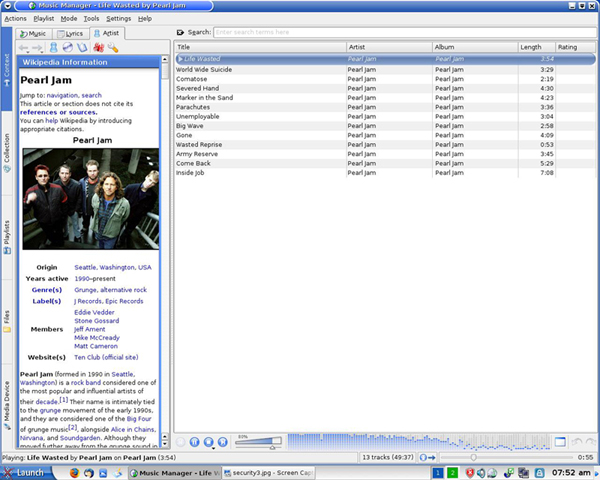
Organize and play your favorite songs
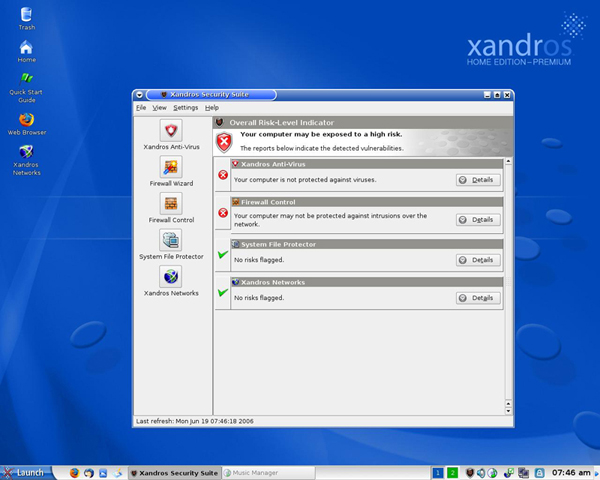
Xandros Security Suite
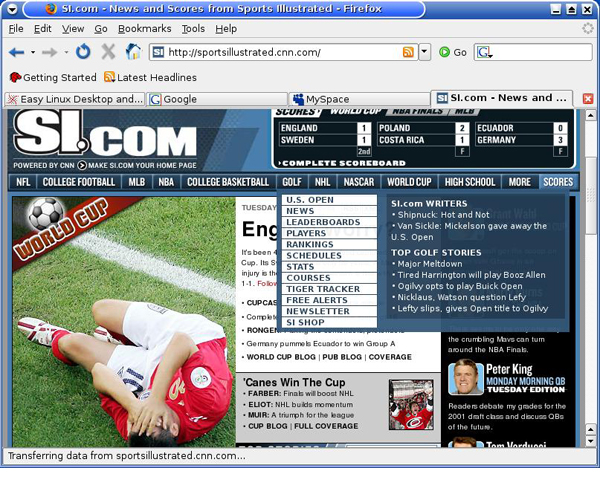
Surf the Web with Firefox